AI governance software for use cases, risk and the EU AI Act
The models work. The question is whether your organization is ready.
Many companies have started AI projects. Far fewer see results. What's usually missing isn't the technology — it's unclear ownership, unresolved data questions, and governance that comes too late.
AI Navigator brings structure to exactly that gap: assess readiness honestly, prioritize use cases, clarify ownership, build architecture. Step by step, building on each other — straight from the practice behind the Enterprise AI Leitfaden.
What the software covers
The seven tools of the path, plus the free EU AI Act Check and the PDF reports — all available in AI Navigator today, details on each page.
AI Navigator covers the path from taking stock to implementation: an AI inventory as a use-case portfolio, the AI Readiness Assessment, Use-Case Scoring, the EU AI Act Check, the Governance Check, the Roadmap Generator, the Architecture Generator for a vendor-neutral reference architecture, the Compliance Center with checklists for the EU AI Act and GDPR, and PDF reports in the Professional plan.
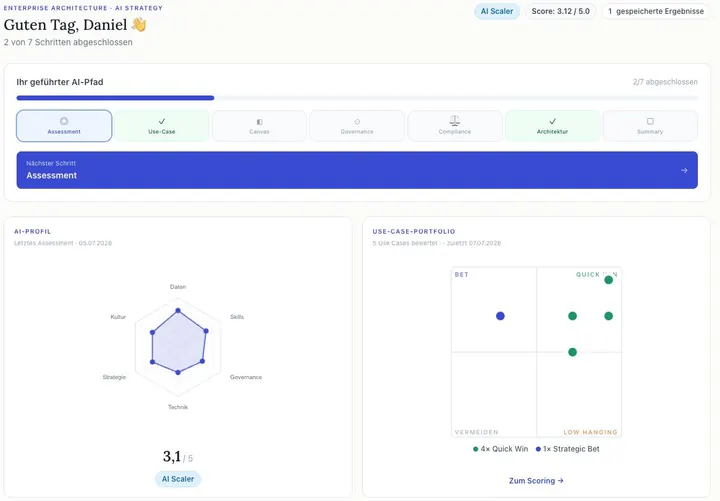
- AI Readiness Assessment: AI maturity across six dimensions, as a quick scan or in full
- AI Use-Case Canvas: describe use cases in eight structured fields
- AI inventory: capture, rate and prioritise your AI use cases as a portfolio in one place (Use-Case Scoring)
- EU AI Act Check: the risk class of your AI system with obligations and deadlines
- Governance Check: six gates from use case to approval – EU AI Act risk class, GDPR, human oversight, documentation
- Roadmap Generator: a three-phase implementation plan matched to your archetype
- Compliance Center: checklists for the EU AI Act and GDPR, optionally ISO 42001, NIS-2, ISO 27001, BAIT and LkSG
- Architecture Generator: a vendor-neutral reference architecture from your IT landscape, use cases and governance requirements
- PDF reports (Professional): executive summary and reports per module
“Not a configuration manual. Not a product catalog. But an honest attempt to describe what enterprise AI means in practice — beyond the marketing promises, and before the first bad decisions get made.”
Daniel Ostner · from the preface of the Enterprise AI Leitfaden
The toolset behind it lives here: start for free, keep going with structure.
Three questions that decide everything
Is your AI system high-risk?
The EU AI Act sounds like bureaucracy. For most systems, the answer is surprisingly relaxed — once you know where to look.
Read the answer →Why do AI projects really fail?
It's almost never about the model. The real pattern rarely shows up in project reports, but constantly in organizations.
Read the answer →How mature is your organization?
Six dimensions decide whether AI takes hold at your company or tips over. Two of them are routinely underestimated.
Read the answer →One path, seven tools
Every result feeds into the next tool — from the first readiness check to the finished reference architecture.
Security & Compliance
Good questions, honest answers
What users most want to know before they start.
How do the seven tools connect?
They build on each other: the readiness assessment produces your profile, the canvas describes the use case, scoring prioritizes, the governance check verifies, and the architecture generator builds the reference architecture from it — including ownership. Each result is automatically picked up in the next step. But you can also start with any single tool.
What can I use for free — and what do I need Pro for?
Five of the seven tools are usable for free (the readiness assessment as a compact quick scan) — including saving and the semantic context detection, which runs entirely without AI calls, plus a small daily AI allowance to try it out. Pro unlocks the architecture generator and the Compliance Center, plus PDF export, sharing, versions, and an expanded AI allowance. The full comparison — including what's not included — is laid out transparently on the pricing page.
Free vs. Pro compared →Where is my data stored?
In the EU (Frankfurt), GDPR-compliant, with no cookies and no third-party tracking scripts. Your inputs belong to you — you can export or delete them at any time.
What does the AI analysis do with my inputs?
It supplements the rule-based results with suggestions — for example, matching components or a classification of your use case. Every AI suggestion is marked as such, and you decide with one click whether to accept it. Which model ran for what is shown transparently next to the result.
Do I need to use SAP for this to be worthwhile?
No. The tools are built vendor-independent. If SAP is part of your landscape, you'll additionally see matching best practices — if not, you simply won't see them.
From the blog
Shorter pieces with a point of view — alongside the guides.
Data Sovereignty Is Now an Architecture Question
Why data sovereignty in DACH enterprises is no longer a compliance checkbox — and what that means for architecture and governance decisions.
Read the post →Start before time pressure decides for you.
Free, EU-hosted, no cookies. You can stop anytime — best to start today.
Start for free